
GL_MAX_TEXTURE_SIZE: your GPU's invisible limit and how Kirin handles giant textures
A modern GPU can run complex 3D games and still reject an excessively tall 2D tileset. The reason lies in physical texture limits, sampling precision and the way a legacy engine represents images that were never expected to grow so large.
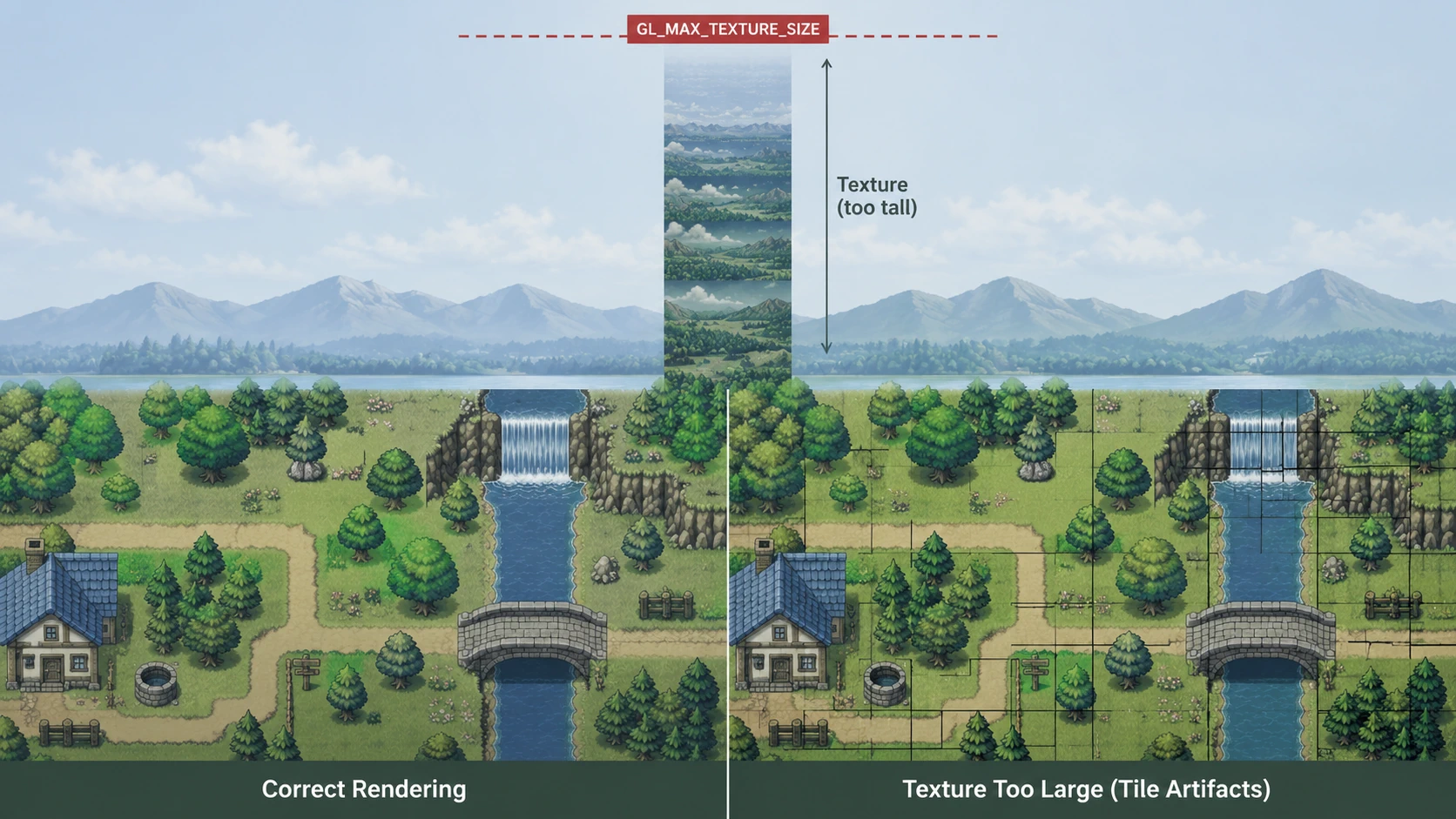
A modern phone may have 8 or 12 GB of memory, a GPU capable of running 3D games, and far more power than any PC from RPG Maker XP's era. It can still fail on something apparently much simpler: a 2D image that is too large.
In large RPG Maker XP and Pokémon Essentials projects, this appears mostly in tilesets that have grown for years and animated sprite sheets containing enormous numbers of frames. The PNG can exist, decode correctly and occupy a reasonable amount of RAM. The failure comes when the renderer tries to turn it into a texture the GPU can use.
The PNG's file size is not the only question. Its dimensions, decoded memory footprint and the largest texture the GPU driver permits all matter.
An image and a texture are not the same thing
When RPG Maker XP asks for Graphics/Tilesets/Exterior.png, the stored file is not yet a GPU texture. It must pass through several stages.
A PNG may occupy only a few megabytes because of compression, then expand into a much larger surface. An 8192 × 8192 RGBA image requires roughly 256 MiB uncompressed. At 16384 × 16384 it approaches 1 GiB; a 32768 × 32768 surface reaches about 4 GiB.
Two separate questions therefore exist: does the image fit in memory? and can the GPU represent it as one texture? The second is directly related to GL_MAX_TEXTURE_SIZE.
What is GL_MAX_TEXTURE_SIZE?
GL_MAX_TEXTURE_SIZE is a limit exposed by OpenGL through the driver. It reports the largest dimension supported for a conventional 2D texture. Khronos describes it as the maximum texture size the implementation can handle.
If a phone reports:
a texture 8192 pixels wide or high is still within the announced limit. An 8193 × 256 image exceeds it even though the other dimension is small.
Within the limit
- 4096 × 4096
- 256 × 8000
- 8192 × 512
- Can become a texture if sufficient resources are also available
Beyond the limit
- 8193 × 256
- 1024 × 10000
- 16384 × 20000 on a GPU limited to 16384
- Cannot exist as one conventional texture
The number is not the amount of VRAM, nor does it promise that a texture just below the maximum will be cheap. It is a capability boundary, not a size recommendation.
Because OpenGL lets software query implementation limits, Kirin should never assume one fixed value for every device. It must ask the hardware actually running the game.
Want to know what your phone supports? Check it with GLView
On Android, GLView Extensions Viewer shows graphics capabilities reported by the device, including OpenGL ES and Vulkan renderer data, versions, extensions and hardware limits.
Look for this value in the OpenGL ES information:
Depending on the GPU and driver, you may see 4096, 8192, 16384 or 32768. Two phones running the same Android version do not necessarily provide the same graphics capability.
This explains behavior that otherwise seems arbitrary: the same project can run on a PC and fail when opening one particular image on a phone.
A desktop GPU can hide the problem for years
Imagine a developer using a desktop GPU with a limit of 32768 while maintaining a 256 × 20000 tileset. Since 20000 is below 32768, the game works and the map draws correctly. There is no visible reason to expect trouble.
Then the project reaches a phone reporting:
The same tileset now has a dimension of 20000. Nothing changed in the PNG or Ruby code. The hardware representing it changed.
mkxp-z itself documents this issue, notes that the maximum varies widely among GPU families, and provides a Mega Surface exception for bitmaps larger than the texture limit.
The classic case: tilesets that grow downward
RPG Maker XP tilesets can grow vertically. A modest resource may accumulate content for years:
- 256 × 4000
- 256 × 8000
- 256 × 12000
- 256 × 18000
- 256 × 22000
The width remains small and the PNG may still look ordinary. Yet a single dimension beyond the device maximum is enough to prevent it from becoming a conventional OpenGL texture. This growth is especially dangerous because a developer may never notice it on a desktop machine with a high limit.
The same problem appears in giant sprite sheets
A sprite or animation sheet can evolve in exactly the same way. Each frame is small, but all of them live inside one logical image.
The frame currently needed may be only a few hundred pixels across, while the traditional architecture uploads the entire sheet as a single texture. The problem lies in physical representation, not necessarily in the logical content Ruby needs.
Before the maximum comes another problem: precision
A more common symptom appears before texture creation fails. The image stays within GL_MAX_TEXTURE_SIZE, the game starts and the map renders, but black lines or fine seams appear between tiles.
The source PNG contains no such lines and looks perfect outside the game. Yet a thin grid appears on the map, sometimes becoming more visible while scrolling.
A large texture does not automatically lose quality because of its size. But as it grows, the normalized-coordinate gap between neighboring texels shrinks, making rendering more sensitive to precision, rounding and filtering.
Why a map can fill with black lines
A GPU does not normally receive a command such as “draw pixel 1234.” The renderer uses texture coordinates, usually normalized between 0 and 1.
In a 256-texel dimension, the approximate normalized separation is:
At 16384 texels:
As the texture grows, texel boundaries are expressed by progressively smaller numerical differences. If a UV coordinate reaches the shader slightly displaced, sampling may touch the neighboring texel, a transparent area or the edge of another atlas region.
The mistake may be invisible in one sprite. Across a tilemap it repeats hundreds of times along a grid and becomes obvious.
Shader precision matters
OpenGL ES defines precision qualifiers such as lowp, mediump and highp. The GLSL ES specification allows mediump to provide substantially less minimum precision than highp. In modern GLSL ES, highp uses 32-bit floating-point precision, whereas mediump only has to satisfy a much lower relative-precision floor.
This does not mean every black line is automatically caused by mediump. Filtering, UV calculation, texel rounding, interpolation and final screen position also play a role. Insufficient precision simply makes it harder to separate very small regions correctly inside a huge texture.
Texture bleeding: when a neighboring tile leaks into the current one
Another related phenomenon is texture bleeding. If filtering samples around a coordinate sitting exactly on a tile boundary, it may blend information from both sides.
The resulting line may be:
- black, when black or transparency surrounds the tile;
- the neighboring tile's color;
- transparent;
- intermittent, changing with camera movement.
This is why a stationary map can appear correct and begin showing lines when the player walks. Camera motion changes exact screen positions and may reveal tiny sampling errors that previously landed inside the expected region.
One resource can pass through three zones
Reasonable texture
- Moderate dimensions
- Easy-to-represent coordinates
- Lower memory pressure
- Normal renderer path
Extreme texture
- Still within the maximum
- Greater UV and filtering sensitivity
- Higher RAM/VRAM cost
- Seams may appear between tiles
A third zone follows: one dimension directly exceeds GL_MAX_TEXTURE_SIZE. At that point, no amount of coordinate refinement can make the GPU create the conventional texture.
What Kirin does when the texture no longer fits
Kirin cannot force a GPU to create a texture larger than its driver announces. When a bitmap loaded from disk exceeds that limit, the Mega Surface concept—carried forward from the mkxp/mkxp-z line—provides a compatibility path for oversized surfaces.
Instead of always assuming:
the runtime can keep the giant surface in main memory and use compatible operations on the regions actually required. mkxp-z documents Mega Surface as an exception for bitmaps exceeding the texture limit, retaining them in RAM for tileset use.
This is especially useful for enormous tilesets: the logical resource may be tens of thousands of pixels tall, but a map never needs to display the entire image at once. It consumes only the small regions corresponding to visible tiles.
The goal is not to pretend the limit does not exist
Mega Surface does not make a giant image free. It still needs RAM, decoding and transfers for regions that are eventually used. Nor does it automatically fix every precision or filtering problem.
It separates two ideas that a simple renderer often couples too tightly:
RPG Maker XP can continue to see a 256 × 20000 bitmap while the device declares a maximum of 16384. Kirin can choose a different internal representation without changing the game's scripts.
Why this matters even more on Android
Android does not represent a single GPU. Kirin can run on Adreno, Mali, PowerVR and other architectures across very different generations and drivers. A resource that never failed on its creator's PC may behave differently on mobile hardware.
Compatibility cannot assume:
The runtime must query the device's real capabilities and choose a strategy. GL_MAX_TEXTURE_SIZE is a concrete limit that turns an RPG Maker XP abstraction into a modern hardware decision.
Quick diagnosis: what the symptom may mean
Map with black lines
- The resource may still be within the maximum
- Inspect UV precision
- Inspect filtering and borders
- Inspect texture bleeding
- Results may vary among GPUs
Bitmap cannot be created
- Check its dimensions
- Query GL_MAX_TEXTURE_SIZE
- Compare both width and height
- Use the Mega Surface path when applicable
- Do not confuse the limit with available RAM
From an OpenGL limit to an architectural decision
The interesting part is not merely discovering that a GPU has a maximum. The limit forces us to ask what a Bitmap really means inside Kirin.
If every Bitmap must always become one texture, RGSS remains tied to one GPU's physical limits. If the runtime separates the logical resource from its representation, it can preserve game behavior across different hardware.
This also explains how future work can extend beyond Mega Surface: regional subdivision, partial caching, preprocessing or graphics packages can reduce the need to treat monolithic images as single textures.
The boundary the developer never had to see
RPG Maker XP was released in 2004; its original projects were not designed for tilesets and animation sheets that would keep growing for two decades. Pokémon Essentials and the fangames built on it pushed that structure much further.
From the creator's perspective, there may be no mistake at all: the resource worked on the desktop GPU where it was made. Kirin encounters a previously hidden boundary only when bringing that content to Android.
Compatibility is not forcing a phone to behave like the original PC. It is preserving the game's result while adapting its representation to the device's actual capabilities.
Sources and tools
- Khronos OpenGL Wiki: queryable parameters and GL_MAX_TEXTURE_SIZE
- Khronos: GLSL ES specification and precision qualifiers
- GLView Extensions Viewer for Android
- mkxp-z: texture-limit and Mega Surface documentation
Check your GPU and try Kirin
Look up GL_MAX_TEXTURE_SIZE on your phone with GLView. If your project uses especially large tilesets or sprite sheets, see how they behave on mobile hardware.